©2025 The Motion Tree, All Rights Reserved. Technical support by LiberalSoft

Cinema 4D is one of the most sophisticated 3D programs available. This program is specially designed for 3D animation works along with other 3D projects. However, as this is a sophisticated 3D program designed for professionals, the operations of this software also need more attention and time to learn. Apparently, you may be thinking exactly how long it takes to learn Cinema 4D.
The answer is that it depends on your dedication, device, and practice. But, if everything is up to the mark, you can have a complete grasp on the program within 1 and a half years. And this process can get lengthy, up to a couple of years. So, to help you reduce the learning duration, we have prepared this article with all the essential tips.
Read on to know more!
Cinema 4D is a 3D software compatible with any 3D work, including OCIO Color Management, Modeling, Animate, Simulation, Render, Redshift Everywhere, Create, Workflow, Track Modifier Tag, User Interface Enhancements, Spline Import, and Create Polygonal Modeling. Professional 3D artists widely use this software to get their job done. Among all the software available for 3D-related works, C4D is the favorite of professionals because of its remarkable benefits, such as:
Moreover, this application’s interface is user-friendly, so anyone can start learning from scratch. And professional 3D artists mostly prefer this software for animation works as the rendering by this application is so smooth. Overall, Cinema 4D is a great 3D application for learning and efficiently completing any pro-level job.
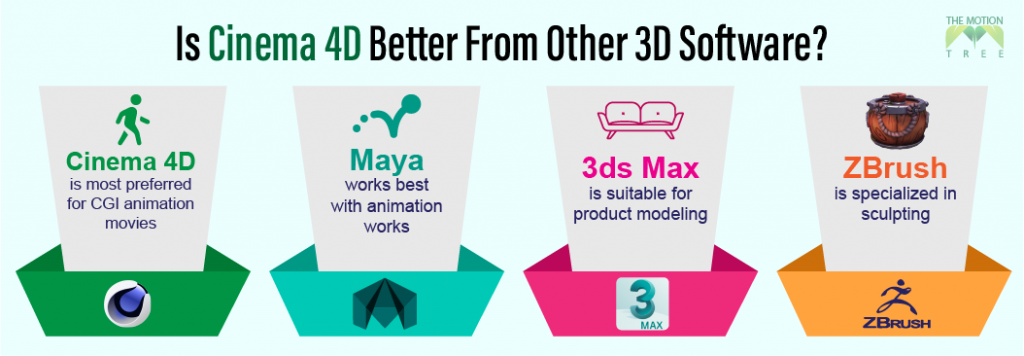
There are several 3D software available to work. But not all are good for professional-level 3D works, and not every software is terrible. However, there are several software programs that the professionals most widely use. Each of these software has its specialty. Like 3D Max is suitable for product modeling, Maya works best with animation works, Zbrush specializes in sculpting, and Cinema 4D is most preferred for CGI animation movies. That means each software has its benefits. Though all the software has its specialization, they have remarkable differences too.
Moreover, you will find all similar features in every software, but not every software is dedicated to all three 3D works. Likely, the sculpting features in the ZBrush are top-notch when compared to the Cinema 4D expertise in the CGI animations. Also, the Maya has remarkable features that help generate 3D characters. But on the other hand, Blender is made for all kinds of 3D works for free.
Like the features, there are also differences in pricing; Blender offers all its features for free, while other software charges a certain amount as a subscription fee. So overall, it is not justified to say Cinema 4D is better than other software. But for specific works like animation and Integration with other software like CAD and Adobe After Effects, Cinema 4D can do the job better.
In most cases, it takes almost 1 to 2 whole years to learn Cinema 4D. However, the learning time of sophisticated programs like 3D varies depending on the learner’s time, device, and determination. If you have a suitable device with the required time to grasp Cinema 4D, you can learn all the tools’ usage and application within a year. But, the time length will increase eventually if you don’t have the device with a suitable device.
Related: How Long Does It Take To Learn Blender
Cinema 4D is a powerful program that needs a powerful PC. Moreover, you can’t do the work efficiently in this program if you do not have a PC that fulfills these requirements.
Windows
Windows 10 (64-bit Version)
Processor- Intel or AMD 64-bit CPU (SSE3 support)
RAM- 16-32GB DDR4 3200Mz
HDD- 256GB SSD
Graphics Card- AMD Polaris (AMD GCN 4) or higher (Radeon RX 400 card or higher), NVIDIA Maxwell GPU (GeForce 900 series card or higher), Intel Kaby Layke or newer supporting DirectX 12 with feature level 11.0
macOS
macOS 10.14.6 or macOS 10.15.7
Processor- Apple M1 Chip
RAM- 8GB or Higher
HDD- 256GB SSD
Graphics Card- macOS GPUFamily1 v3 or higher, and officially supported hardware by Apple
Learning Cinema 4D is a Lengthy process and requires your dedicated time. However, you can learn to use this software easily and quickly only if you approach it correctly. And here, we have added some tips to help you learn Cinema 4D.
Watching the tutorials from different resources like YouTube and other platforms is an excellent option for learning C4D. Search with different keywords related to learning Cinema 4D and observe the tutorials. Also, do not forget to note down the instructions. Noting the instructions down will help later in practice
Only watching the videos will not work if you do not apply them practically. So run the previously done projects you find on Cinema 4D and try to reverse engineer them. In other words, customize the projects following the instructions you noted down. Of course, you might make mistakes, but believe me. Those will become the best lessons.
Doing creative works like 3D demands a ton of patience and consistency. When you start the working process, you might fail again and again, but do not lose hope and keep practicing. Instead, give your time dedicatedly, and surely you will succeed.
If you are new to any creative field, working randomly or in a disorderly manner is a great way to learn more efficiently. However, the more you mess up, the more you create problems. And when you create problems, you will look for solutions.
Cinema4D is an advanced 3D learning program, and it takes almost 1 or 2 years to have a complete grasp on. However, the duration of learning varies depending on the user’s potential. So, there is no exact time frame in reality. It entirely depends on you how much time it will take to learn Cinema 4D. However, as an expert working on 3D for a while, I suggest learning 3D with Blender if you are a beginner because C4D doesn’t offer free plans.
1
2
3
April 7, 2026
6
April 3, 2026
7
April 3, 2026
8
10
April 3, 2026


